How to Create a GeM Account (Simple Step-by-Step Guide for New Sellers)
If you want to start selling to government departments through GeM, the very first step is creating your GeM Seller Account. Good news — it’s not as complicated as people think. With the right documents and the right process, you can get your account approved in just a few minutes.
Let’s break it down in a clean, simple, beginner-friendly way.
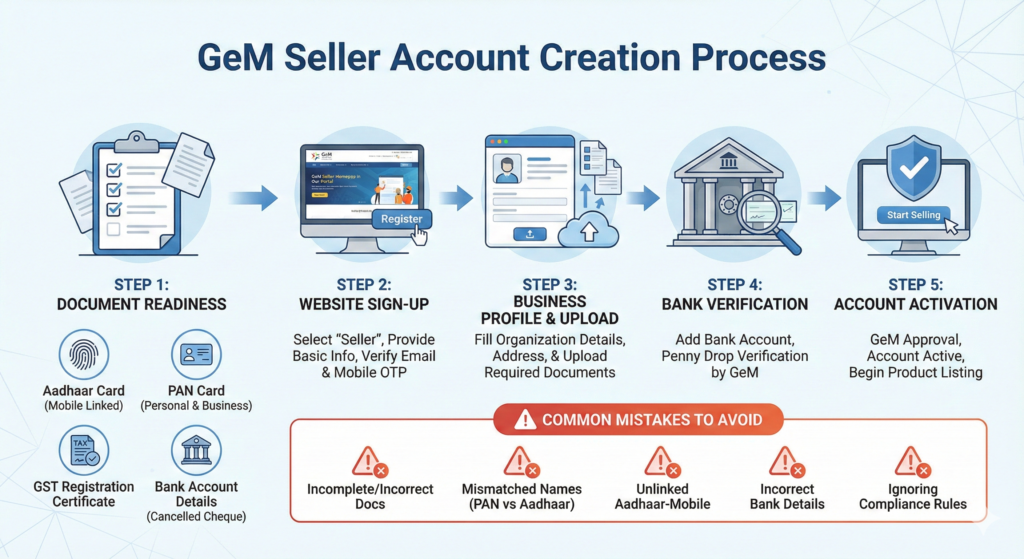
Step 1: Keep Your Documents Ready
Before starting registration, make sure you have:
✔ Aadhaar of business owner
✔ PAN of business
✔ Mobile number linked to Aadhaar
✔ Email ID
✔ Bank account details
✔ GST certificate
✔ Business address details
If these are ready, your registration becomes super smooth.
Step 2: Visit the Official GeM Website
Go to gem.gov.in → Click on Sign Up → Select Seller.
A small form will pop up where you enter basic details like:
- Aadhaar number
- Mobile OTP
- Email verification
Everything happens automatically, no manual approval.
Step 3: Fill Business Profile
Once your login is created, you need to complete the business profile.
This includes:
✔ Business type (Proprietor / Company / Partnership)
✔ Business name
✔ Constitution of business
✔ Date of establishment
✔ Business address
✔ GST & PAN auto-fetch
✔ Bank details
Make sure all details match your documents. Any mismatch may delay your product listing.
Step 4: Add Additional Documents
Depending on your business type, you may need to upload:
- Udyam (for MSME benefits)
- Shop Act
- Company documents
- Authorization letters
These boost your credibility and also give you advantages in tenders.
Step 5: Complete Bank Verification
GeM deposits a small amount to verify your bank account.
It usually reflects in 10–20 minutes.
Once verified → Your account becomes Active.
Step 6: Start Your Journey
Now your account is fully ready!
You can start:
✔ Adding products
✔ Listing services
✔ Applying for OEM
✔ Participating in bids
✔ Getting orders
Your GeM business officially begins from here.
Common Mistakes New Sellers Make
❌ Using a mobile number not linked with Aadhaar
❌ Entering different address in GST & GeM
❌ Not completing bank verification
❌ Wrong business category selection
❌ Uploading low-quality documents
Avoid these to prevent delays and rejections.
Creating a GeM account is the first big step toward entering the government marketplace. Once it’s done correctly, your business gets access to thousands of buyers and endless opportunities.
👉 And if you want a hassle-free registration without errors, delays, or confusion — GeM Master will set up your complete account professionally. Fast, accurate, and 100% compliant. We make GeM easy for you.